The Website That Was Working — and Quietly Failing
How a technical audit uncovered two architecture problems hiding in plain sight — and what a headless CMS migration fixed that 18 months of maintenance never could.
Endevo — Digital Legacy Platform
Blue Sprout Agency, Chino Hills CA
Sanity CMS + Per-page SEO
There is a specific kind of problem that is easy to miss because nothing is broken.
The site loads. Pages render. Visitors can find the content. Technically, everything works. But technically working and actually performing are two very different things. The gap between them is where businesses quietly lose ground — in search rankings, in developer overhead, and in the compounding cost of maintaining systems that were never designed to scale.
This is the story of Endevo — a digital legacy content platform in the end-of-life planning space — and the two architecture problems we found before we ever touched the code.
What a Technical Audit Actually Looks At
When Endevo came to us for a technical consultation, the first thing we did was look at the site from the outside before opening a single file.
Not the homepage. Not the design. The architecture. How is content stored? How does it flow to the frontend? What does Google actually see when it crawls each URL?
Endevo had been built as a React SPA — a modern Vite-based frontend with a clean UI and a growing blog. The platform's mission was to help people document and share their digital legacy: a content engine built to create and distribute personal histories. It had 58 published blog posts, a working design, and a development team maintaining it actively. And it had two structural problems neither the team nor the client had been able to name.
Two Problems Hiding in Plain Sight
1A 7,000-Line TypeScript File With All the Content Inside It
Every one of the 58 blog posts — every title, every paragraph, every publication date — lived inside a single TypeScript array. The file had grown past 7,000 lines. It worked perfectly. And it was quietly unmaintainable.
Publishing a new post meant a developer writing code, running a deployment, and waiting for CI/CD. Editing a typo required a pull request. The content team — virtual assistants and web editors who would eventually own the blog — had no path to the CMS. Because there was no CMS. There was just a file.
258 Blog Posts Indexed as One Webpage
The SEO structure was treating the entire blog as a single page. One title tag. One meta description. No per-page Open Graph tags. No structured data. Google was crawling 58 individual articles — each with unique content, unique value, and unique search intent — and indexing them all under the same metadata. The homepage title was repeating across every single URL.
58 pieces of content. Zero individual search impressions. Every post was invisible as a standalone result.
Why the Architecture Had Outgrown Its Approach
React is a powerful UI library. It has no opinion on where your content lives. So most React projects default to the simplest available pattern: put the content in the code. A JSON file, a TypeScript array, a data folder. For a landing page, this is fine. For a blog growing toward 100 posts that needs to rank in search, it becomes a structural bottleneck.
Endevo had also evaluated a static blog platform — PopUp — that exposed no RSS API and had a response latency that made programmatic content distribution impractical. The content engine was creating. The content engine was not distributing cleanly. And the architecture hadn't been revisited since the site was first built.
The options: bring in a PHP-backed CMS (wrong fit for a Vite/React codebase), build a custom API layer (unnecessary complexity for a blog), or adopt a modern headless CMS that integrates cleanly with the existing stack.
Why We Chose Sanity CMS
The deciding factor was one thing: the schema lives in your codebase. Not behind a vendor dashboard. Defined in TypeScript, committed to git, versioned exactly like the application code. For a client who needed to own their content infrastructure long-term — and hand it off to a VA or web editor without onboarding a developer — that was the right model.
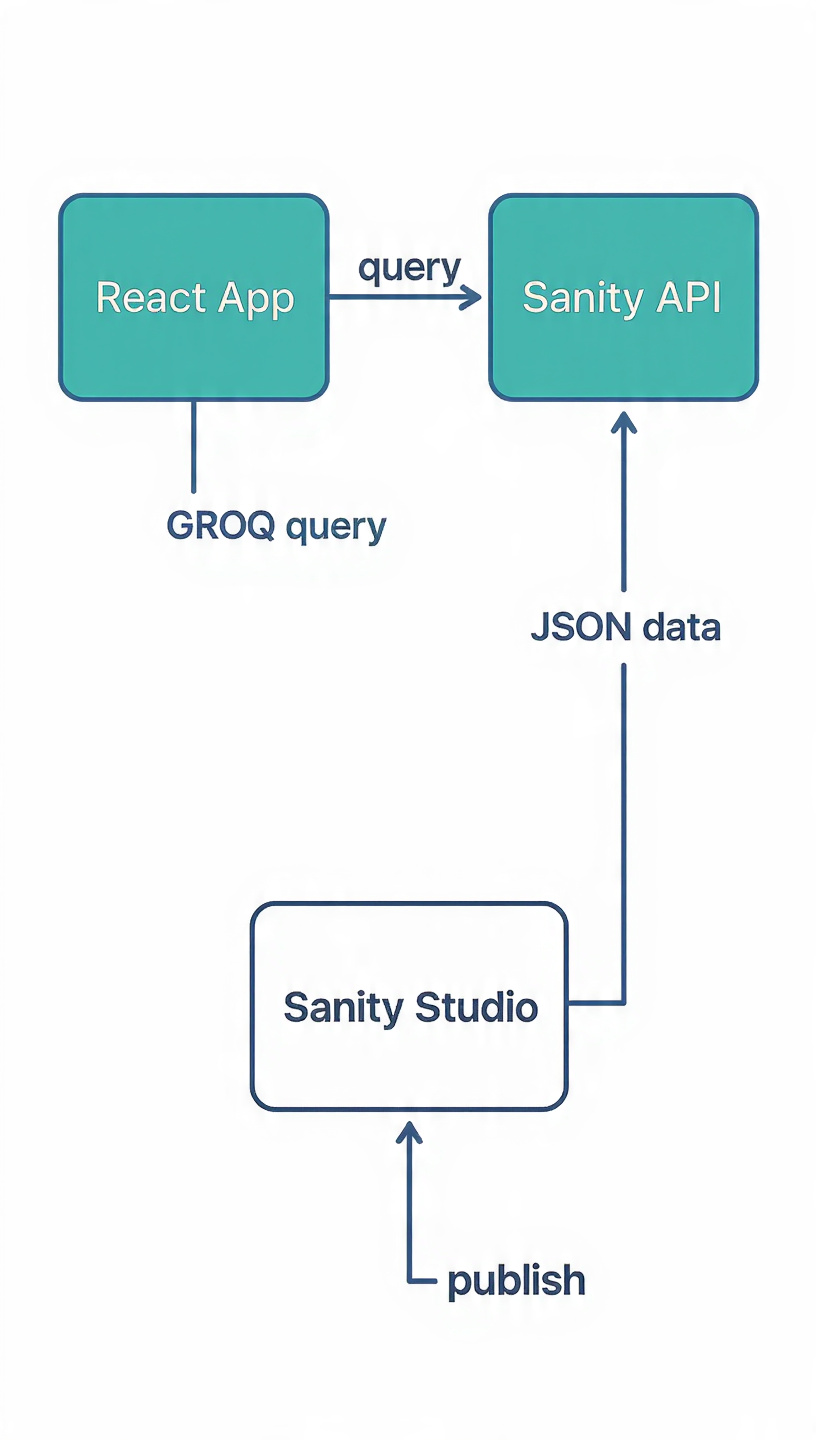
Editors publish in Sanity Studio → content stored via the API → React app fetches it with a GROQ query.
The flow is clean: Sanity Studio is a web-based GUI where a VA or editor logs in, writes a post, adds images, and hits Publish. The content is stored in Sanity's cloud dataset and served through the Sanity API via GROQ queries from the React app. The developer never needs to touch a post again.
Sanity's CDN handles image optimization automatically. No manual resizing, no worrying about WebP conversion, no separate image hosting. Upload the original; Sanity delivers the right size to the right device.
How the Migration Worked — Without Breaking Anything
The goal was zero downtime and zero broken URLs. We achieved it through a three-part implementation:
Zero-downtime content deduplication
We built a priority layer into the data fetching logic: Sanity posts took precedence; the existing static TypeScript posts served as fallback for anything not yet migrated. Both sources coexisted. No page went dark. No URL returned a 404. The 58 posts migrated programmatically through a single script — no copy-pasting.
Per-page SEO infrastructure
With content now structured per post, we added react-helmet-async to inject individual title tags, unique meta descriptions, and Open Graph tags on every blog URL. JSON-LD BlogPosting structured data was added to the blog page, conforming to Schema.org standards — the same format Google uses to generate rich results.
Sitemap update and Search Console submission
The sitemap was regenerated to reflect each individual post as its own URL, with changefreq set to weekly. Submitted to Google Search Console the same day. Google began discovering individual article titles within days.
What Changed After Launch
Posts migrated with zero downtime
Line file shrinking toward zero
Developer dependency for new posts
To individual article indexing
- Google Search Console began indexing individual article titles instead of the homepage title repeated across every URL
- Rich result eligibility appeared for blog and video content in Google's testing tool
- The editorial team — VAs and web editors — can now publish, update, and manage content independently through Sanity Studio's GUI, with image uploads, draft previews, and publish controls built in
- Core Web Vitals stayed green post-deployment — Sanity's CDN handles image optimization automatically
- The 7,000-line file started shrinking — and will eventually be deleted entirely
The Lesson That Applies Beyond This Project
The technical work here — a headless CMS, per-page metadata, a migration script — is straightforward once the problem is clear. The harder skill is stepping back far enough to see where the architecture no longer fits what the business actually needs.
Most of the websites we audit are not broken. They are quietly underperforming because a decision that made sense at launch has never been revisited. The static data file made sense when there were five posts. The SEO setup made sense before search ranking was a priority. The developer dependency made sense before the team started publishing weekly.
Systems drift from their goals. A technical audit exists to close that gap — before the cost compounds further.
"Technically working and actually performing are two very different things. The gap between them is where businesses quietly lose ground."
— Blue Sprout Agency
Found this useful?
Share it with a founder or developer who's running a site that's technically working — but quietly failing. And if you read it on Medium, a clap goes a long way.
Related
Endevo — Full Case Study
Metrics, timeline, tech stack, and the full before/after breakdown.
Is your website in the same position?
If your site was built more than 18 months ago and has never had a structured audit, the gap between how it was built and what it needs to do now is worth examining. We start every engagement with a diagnostic — not a pitch.
Blue Sprout Agency · Chino Hills, CA · 657-217-4737